Email that stays

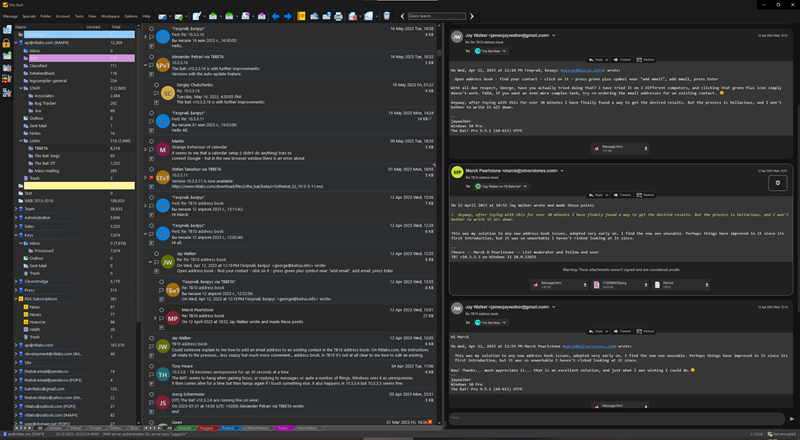
A desktop-native email client with multiple encryption streams, a configurable Sorting Office, and the kind of power-user controls you stopped getting when everything moved to the browser.

The Bat! desktop client with folder tree, message list, and signed message preview

Four tools you'll reach for every day.

Powerful tools for organizing, finding, writing, and protecting email — all built into one focused desktop client.

Calendar

A full calendar built into your mail client — not bolted on. Subscribe to CalDAV, Google Calendar, iCloud, or local iCal. Drag events straight out of messages.

  • Week, day, and month views with colour-coded calendars
  • CalDAV, Google, iCloud, and local iCal out of the box
  • Create events from selected text in a message
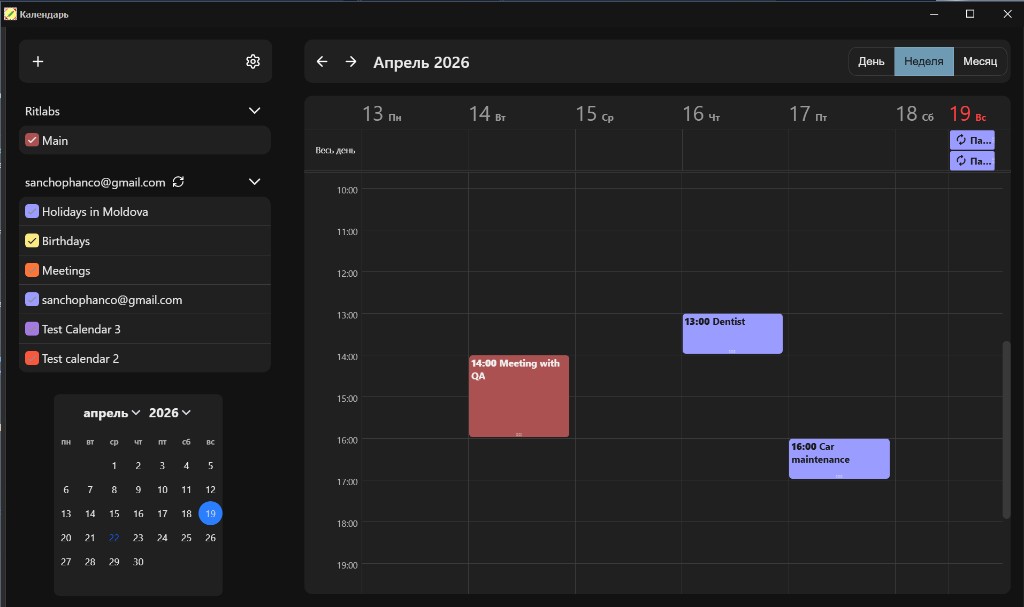
The Bat! Calendar week view with multiple color-coded calendars and events

Sorting Office

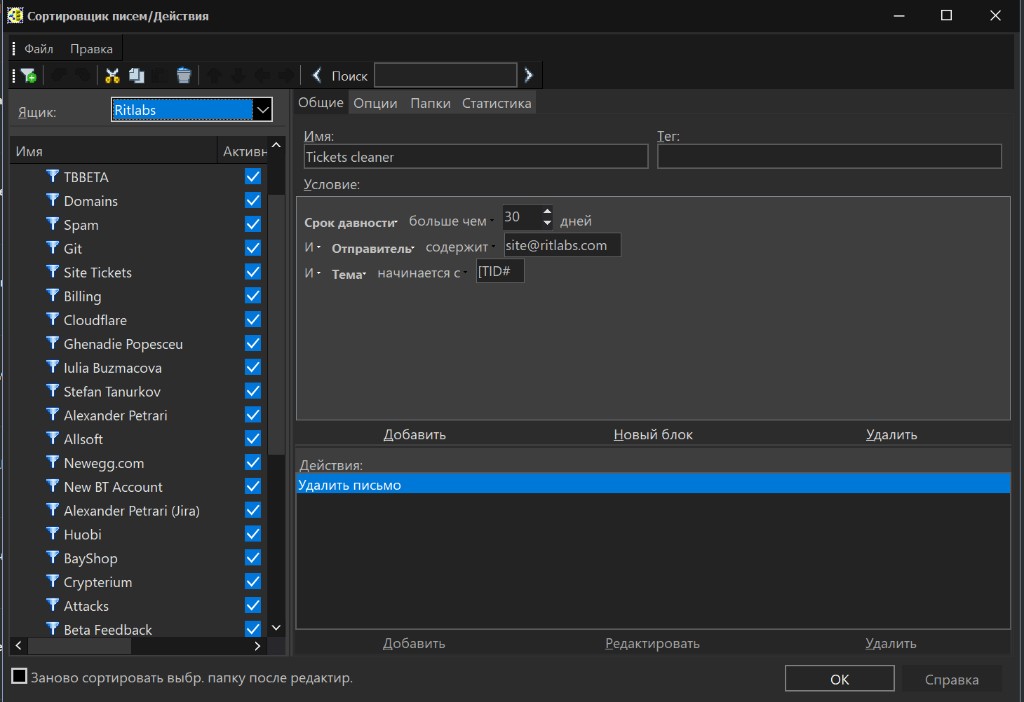
Our rule engine has been refined since 1998 — and it shows. Conditions that chain with AND/OR, per-account and global scopes, full regex support, previewed against real mail before saving.

  • Condition blocks with full boolean logic
  • Actions: move, tag, delete, forward, run script
  • Per-account rule sets, tested against real mail before saving
The Bat! Sorting Office rule editor with conditions and actions

MailTicker

A discreet on-screen ticker that surfaces new mail without breaking your flow. Shows sender, subject, size, date — anchored anywhere on your desktop, fully styled by you.

  • Always-on-top strip with sender, subject, size, date
  • Per-folder colour rules — spam is one colour, clients another
  • Click-through to open, right-click to triage
From:Elena Marchetti4 KB
Subject:Re: Q2 infrastructure audit — signed report21.04.2026
From:Marcus Halloway18 KB
Subject:Contract renewal — revised terms for Q321.04.2026
From:release-notes@ritlabs.com12 KB
Subject:The Bat! update is out — release notes19.04.2026
From:Stefan Tanurkov68 KB
Subject:Preview build for Voyager USB rollout18.04.2026
From:Maria Plesca22 KB
Subject:Design review — MailTicker spacing17.04.2026
From:Andrei Cernei9 KB
Subject:Sorting Office rule: subscriptions16.04.2026
From:OpenPGP Keyserver4 KB
Subject:Key expiration notice15.04.2026
From:Iulia Buzmacova28 KB
Subject:Re: Voyager USB rollout14.04.2026

Quick Templates

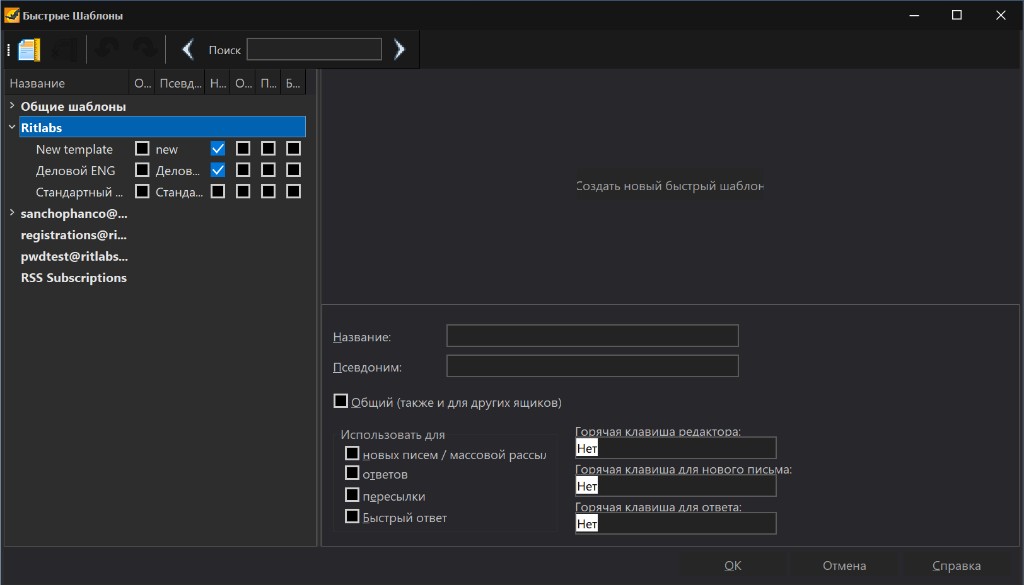
Reusable message skeletons with macros, per-recipient substitutions, and hotkey bindings. Built for people who reply for a living.

  • Macros, conditionals, and recipient-aware substitutions
  • Global and per-account template libraries
  • Bind any template to a keystroke, for new mail or replies
The Bat! Quick Templates manager with template tree and editor

Also in the box

OpenPGP and S/MIME

Native end-to-end encryption, smart-card support, SSL/TLS for every protocol.

Virtual Folders

Saved searches that stay live across accounts and years of archives.

Conversation View

Compact threaded view — toggle on when a thread gets deep, off when you want the list.

Message Dispatcher

Preview mail on the server before downloading. Delete spam before it touches your disk.

Message Finder

Quickly locate emails using powerful filters, keywords, RegExp, and advanced search.

Hardened defaults

No HTML scripts, no auto-loading external images, no dangerous attachment previews.

Choose the edition that fits you best.

Get a perpetual license or stay current with a flexible subscription.

Perpetual licenses

The Bat! Home

$39.99one-time

For personal correspondence on one machine. A perpetual license for individual users.

  • Unlimited email accounts
  • IMAP4, POP3, SMTP, MAPI
  • Sorting Office, MailTicker, Virtual Folders
  • OpenPGP and S/MIME encryption
  • Free updates through the current major version
Buy Home - $39.99

Or subscribe

Prefer a subscription?

Monthly access with the latest The Bat! version, account-managed licenses, and optional AI tools.

The Bat! Subscription

$59.99per month

A subscription plan for staying current with The Bat! across releases.

  • Current The Bat! desktop client
  • All maintenance updates while active
  • Account and license management
  • Standard email support
Subscribe - $59.99

AI Add-on

$9.99per month

AI-assisted mail workflows as an add-on for an existing The Bat! license or subscription.

  • AI writing assistance
  • Message summarization
  • Reply drafting
  • Works alongside The Bat! plans
Add AI - $9.99

Volume licensing starts at 2 seats. Tiered discounts lower the price per license as your order grows. Contact sales →

Helpful answers before you get started.

The Bat! is currently Windows-native. That focus is what allowed the team to keep refining a polished desktop client for decades. In the meantime it runs well inside a Windows VM or under Wine.

Yes. The Bat! supports IMAP4, POP3, SMTP, and Microsoft MAPI, with OAuth 2.0 where providers require it.

You keep the version you already bought indefinitely, and upgrade pricing is reduced when you choose to move to the next major release.

Voyager is the portable edition included with Professional. It runs from a USB stick and carries accounts, keys, and settings with it.

Ready to try The Bat!?

Try The Bat! free for 30 days, with no account required.